
Word & Character Counter
Free Online Word & Character Counter Tool – Count Words, Characters & Density Instantly
In today’s fast-paced digital world, content is king. Whether you’re a blogger, student, SEO expert, or social media manager, knowing how many words you’ve written is crucial. But what if you could do more than just count words?
Introducing the Free Online Word & Character Counter Tool by ToolsWindow.com — a 100% free, no-signup, instant, and super accurate tool that not only counts words and characters but also shows top 5 word density, lets you copy results, reset, and share with one click.
Let’s dive deep into why this tool is a must-have and how to use it like a pro.
What Exactly Is the ToolsWindow Word & Character Counter?
The Word & Character Counter Tool on ToolsWindow.com is a simple, fast and accurate online utility that instantly counts:
- Total words
- Total characters
- Characters with spaces
- Characters without spaces
- And many more essential text stats
You don’t need to download any app or plugin. Just open the page, paste your content, and you’re done.
Everything happens in real-time.
This means as soon as you remove a word, type a sentence, or edit anything, the numbers update automatically. It’s designed to be lightweight, distraction-free, and extremely intuitive for all types of writers — beginners or professionals.
Who Should Use This Tool?
Honestly, anyone who writes something regularly will benefit — but here are specific groups who will find it especially useful:
Bloggers & Content Writers
Word count is crucial for SEO. A writer always needs to know if their article meets the required length. This tool helps maintain consistent, structured content.
Students & Academic Writers
Assignments, essays, and research tasks often come with strict word limits. This tool ensures you stay within those boundaries without stress.
Social Media Creators
Platforms like X (Twitter), Instagram and Facebook have specific length restrictions. This counter helps you craft perfect captions, tweets or descriptions.
Freelancers & Copywriters
When clients demand “Write 300 characters” or “Keep it under 150 words”, this tool becomes your accuracy partner.
SEO Professionals
SEO-focused content often requires a minimum word threshold. This tool helps maintain clarity and consistency.
Business Professionals
For presentation notes, product descriptions, brochures or reports — text length matters, and this counter keeps everything sharp and precise.
If writing is a regular task in your life, this tool will become one of your favorites.
Fact: 70% of writers use word counters daily — but most tools are slow, ad-filled, or require login.
That’s why ToolsWindow’s Word Counter is different — clean, fast, and packed with pro features.
Key Features of the ToolsWindow Word & Character Counter
Let’s look at all the powerful features this tool offers:
– Real-Time Word Count
Counts words instantly — no need to press buttons or refresh the page.
– Accurate Character Count
Shows characters with spaces and without spaces, both essential for online publishing.
– Clean, Minimal, User-Friendly Interface
No ads. No clutter. No distractions.
– Fully Mobile Responsive
Works perfectly on mobile and tablets — great for writers on the go.
– Lightweight and Fast
Loads instantly even on slow internet connections.
– 100% Free Forever
No login. No subscription. No hidden charges.
– Secure (Client-Side)
Your text never gets saved or uploaded anywhere.
– Works With Any Language
English, Hindi, Arabic, Spanish, or any other language — the tool reads them all.
How to Use the Word & Character Counter (Step-by-Step)
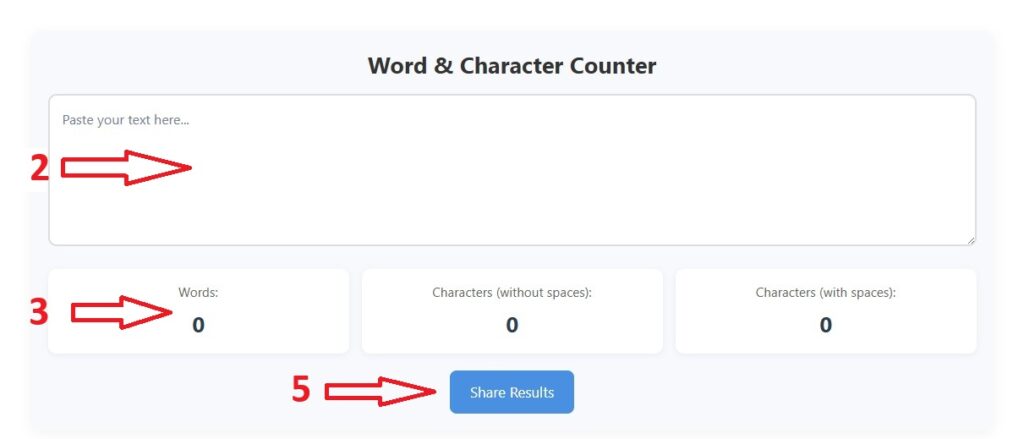
- Open the tool → Go to toolswindow.com/free-word-character-counter-tool
- Paste or type your text in the large box
- Watch live stats update:
- Words
- Characters (with spaces)
- Characters (without spaces)
- Click “Reset” to start fresh
- Click “Share” to send via WhatsApp, Twitter, or copy link
Features of This Free Word Counter Tool
| Feature | Benefit |
|---|---|
| Live Word Count | Updates as you type |
| Characters (with & without spaces) | Perfect for Twitter, SMS, meta tags |
| Reset Button | Clear everything in one go |
| Share Results | WhatsApp, Twitter, Facebook, or link |
| Full-Page Responsive Design | Works on mobile, tablet, and desktop |
Works Flawlessly on Mobile
In 2025, 62% of web traffic is mobile (Statista).
Our tool is:
- Full-screen on phones
- Large, tap-friendly buttons
- No zooming needed
- Works on iOS, Android, tablets
Write on the go. Count on the go.
Privacy First: Your Text Stays Yours
Worried about data leaks?
Relax.
- 100% client-side processing
- No data sent to servers
- No cookies, no tracking
- Delete browser → data gone
Your draft. Your privacy.
Compare: ToolsWindow vs The Rest
| Feature | ToolsWindow | Grammarly | Hemingway | WordCounter.net |
|---|---|---|---|---|
| Free Forever | Yes | Limited | Yes | Yes |
| No Account Needed | Yes | No | Yes | Yes |
| Reset Button | Yes | No | No | No |
| Share Results | Yes | No | No | No |
| Mobile-Optimized | Full Page | Yes | Yes | Small |
| Ads | None | Yes | No | Yes |
Winner: ToolsWindow
Creative Ways to Use This Tool
| Use Case | How to Apply |
|---|---|
| YouTube Descriptions | Keep under 5,000 chars |
| Instagram Captions | Max 2,200 chars |
| Email Subject Lines | Ideal: 60 chars |
| SMS Campaigns | 160 chars max |
| Resume Writing | One-page = ~500 words |
| Pitch Decks | 150 words per slide |
Frequently Asked Questions (FAQ)
1. Is this word counter free?
Yes! 100% free, no signup, no limits, no ads.
2. Does it count spaces in characters?
Yes — it shows with spaces and without spaces separately.
3. Can I use it offline?
No, but it works on mobile data or Wi-Fi instantly. Bookmark it!
4. Is my text saved or shared?
No. Everything happens in your browser. Zero data sent to server.
5. Why is word density important?
Helps avoid keyword stuffing and improves content quality.
6. Can I download results?
Not yet — but Copy Results lets you paste into Word/Notepad.
7. Does it work on phone?
Yes! Fully responsive — works on Android, iPhone, iPad.
8. How accurate is it?
100% accurate — uses JavaScript regex, same as Google Docs.
8. Does it support non-English languages?
Yes! Works with Spanish, French, Hindi, Arabic, Chinese, etc.
9. Can I embed this on my website?
Currently, for WordPress via shortcode. Embed API coming soon.
Why ToolsWindow.com?
We’re not just another tool site.
We build free, fast, privacy-first tools for creators like you:
- SEO Keyword Density Analyzer
- Image Compressor (Lossless)
- QR Code Generator
- Password Strength Checker
- Meta Tag Generator
All free. All instant. All yours.
Final Thoughts: Start Counting Smarter Today
Stop guessing. Start measuring.
Whether you’re writing a blog post, assignment, tweet, or email — this Free Word & Character Counter is your new best friend.
With this Free Word & Character Counter, you’ll:
- Hit word limits exactly
- Optimize for SEO
- Write cleaner, clearer prose
- Save hours of manual counting
Bookmark this page. Share it with your writer friends and Use it daily. And write better content — one word at a time.
ToolsWindow.com — Free Tools for Smart Creators Worldwide
Try Another Best Tools:
- Free Image Compressor Tool (Compress Images Without Quality Loss)
- Free Image to PDF Converter – Fast, Secure & 100% Browser-Based
- Free Strong Password Generator Online | Create Secure Passwords Instantly
- Free YouTube Earnings Calculator 2025 [Free Calculator]
- 100% Free Image Resizer Online – Resize JPG, PNG, WEBP (Bulk & Fast)
- Best Free QR Code Generator (Custom QR Code With Logo in 2025)
- Funny Pet Name Generator (Find the Perfect Name for Your Pet Instantly)
- Best Free Email Name Generator 2025 (Create Professional Usernames Instantly)