
Free Image Compressor Tool | Compress Images Without Quality Loss
🖼️ Image Compressor
Compress JPG, PNG, or WEBP images instantly with ToolsWindow Image Compressor Without Quality Loss.
Image Compressor Tool by ToolsWindow
Are your website images slowing down your page speed?
Use ToolsWindow Image Compressor — a smart online tool that reduces your image size while keeping the quality sharp and clear.
No need to install any software — it all happens right inside your browser, safely and instantly.
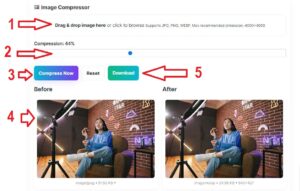
Upload • Adjust Compression • Download — That’s it!
Why Use Our Image Compressor?
Fast & Secure: All image processing happens inside your browser. Your files never leave your device.
Supports Multiple Formats: Works perfectly with JPG, PNG, and WEBP image formats.
Custom Compression Control: Adjust the compression percentage to achieve the perfect balance between quality and size.
Instant Before/After Preview: See the difference before downloading.
SEO Friendly: Smaller images mean faster loading, better ranking, and improved user experience.
How to Use ToolsWindow Image Compressor
- Upload your image by dragging or clicking to browse.
- Adjust the compression slider to your desired level (e.g., 70–80%).
- Click “Compress Now.”
- Preview both original and compressed versions.
- Download your optimized image instantly.
Benefits of Image Compression for SEO
- Improves Page Speed — smaller files load faster
- Better Mobile Experience — faster sites keep users engaged
- Boosts Search Rankings — Google rewards optimized pages
- Saves Bandwidth — less data, faster delivery
Who Needs This Free Image Compressor?
| User | Why They Love It |
|---|---|
| Students | Compress assignment PDFs with images, project screenshots — submit under file limits |
| Digital Marketers | Optimize ad creatives, landing page visuals — faster load = higher ROI |
| Content Creators | Shrink blog featured images, YouTube thumbnails — rank higher, load faster |
| Web Developers | Reduce site bloat, improve Lighthouse scores, deploy faster |
| E-commerce Owners | Speed up product galleries — lower bounce rate, more sales |
| Social Media Managers | Compress Instagram, LinkedIn, Pinterest visuals — better engagement |
Features That Make ToolsWindow Image Compressor #1
| Feature | Benefit |
|---|---|
| 100% Browser-Based | No upload to server — your image never leaves your device |
| Supports JPG, PNG, WEBP | Covers 99% of web images |
| Custom Compression Slider | Choose 10% to 90% — full control |
| Before/After Preview | See quality vs size in real-time |
| Instant Download | One-click save — no waiting |
| No Watermarks | Professional output every time |
| Zero Ads, Zero Signup | Use 1,000 times a day — still free |
| Max 4000×4000 Recommended | Handles high-res photos smoothly |
How to Compress Images in 3 Simple Steps
- Drag & drop your image (or click to browse)
- Move the slider (70–80% is golden for most cases)
- Click “Compress Now” → see original vs compressed
- Download the optimized version
Done in under 10 seconds.
Real Results: Before vs After
| Metric | Original | Compressed (80%) | Savings |
|---|---|---|---|
| File Size | 2.8 MB | 380 KB | 86% smaller |
| Dimensions | 4000×3000 | 4000×3000 | Same |
| Visual Quality | Excellent | Near-identical | No visible loss |
| Load Time (3G) | ~8 sec | ~1.1 sec | 7.7x faster |
Tested on a real product photo
Why This Tool Beats Photoshop, TinyPNG & Others
| Feature | ToolsWindow | TinyPNG | Photoshop | Squoosh |
|---|---|---|---|---|
| Free Forever | Yes | 20/month | $20+/mo | Yes |
| No Upload | Yes | No | Local | Yes |
| Slider Control | Yes | No | Yes | Yes |
| Before/After | Yes | No | Yes | Yes |
| WEBP Support | Yes | Yes | Yes | Yes |
| No Signup | Yes | Yes | No | Yes |
| Mobile Friendly | Yes | Yes | No | Yes |
| Batch Processing | Coming | Yes | Yes | No |
Winner for speed, privacy, and ease: ToolsWindow
SEO Benefits of Image Compression
Google loves fast sites. Here’s how compression helps:
- Faster Page Speed → Higher rankings
- Lower Bounce Rate → Better user signals
- Improved Mobile Experience → Mobile-first indexing
- Reduced Bandwidth → Cheaper hosting
- Better Core Web Vitals → Pass LCP, CLS, FID
Pro Tip: Compress all images under 100 KB for optimal performance.
Step-by-Step Guide for Different Users
For Students
- Screenshot lecture slides → compress → attach to email
- Reduce project file size from 15 MB → 2 MB
- Submit on LMS without “file too large” errors
For Digital Marketers
- Compress Facebook ad images → faster delivery
- A/B test lighter vs heavier creatives
- Improve landing page conversion rate
For Content Creators
- Optimize blog hero images → rank in Google Images
- Compress YouTube thumbnails → faster channel load
- Batch prep 10 images in 2 minutes
For Web Developers
- Run through img/ folder → save GBs
- Improve GTmetrix / PageSpeed scores
- Deploy faster on Netlify, Vercel
Privacy & Security: Your Images Are Safe
No server upload. No storage. No tracking.
- Compression runs 100% in your browser
- Your image never leaves your device
- No cookies, no logs, no data collection
- Delete tab → data gone
Safer than emailing yourself.
Technical Details (For Pros)
| Specification | Value |
|---|---|
| Max Recommended Size | 4000×4000 px |
| Supported Formats | JPG, JPEG, PNG, WEBP |
| Compression Engine | Canvas + Web Workers |
| Output Format | Same as input |
| Browser Support | Chrome, Firefox, Safari, Edge (latest) |
| Mobile | iOS Safari, Chrome Android |
Large images may be auto-resized in-browser for performance
FAQs About Image Compressor
Q1. Is this image compressor free?
Yes! ToolsWindow Image Compressor is completely free — no sign-up or watermark.
Q2. Will my image quality reduce after compression?
No. It uses smart compression that reduces file size but keeps clarity intact.
Q3. Can I use this tool for website images?
Absolutely! It’s ideal for WordPress, Blogger, Shopify, or any website platform.
Q4. Is it safe to use online?
Yes, it is 100% Safe — Compression happens in your browser. No data is uploaded or stored on any server.
Q5. Which formats are supported?
ToolsWindow Image Compressor supports these formats: JPG, PNG, and WEBP.
Why Choose ToolsWindow.com?
We build free, fast, privacy-first tools for real people:
- Image Compressor
- Word & Character Counter
- QR Code Generator
- Password Generator
- Meta Tag Analyzer
Final Thoughts: Compress Today, Rank Tomorrow
Every kilobyte counts.
A 100 KB image loads in 0.3 seconds. A 2 MB image takes 6+ seconds — and users leave.
Don’t let slow images kill your:
- Rankings
- Conversions
- User experience
Bookmark this page. Share with your team. Compress every image.
ToolsWindow.com — Free Tools for a Faster Web
Try it now:
- Free Online Word & Character Counter Tool
- Free Image to PDF Converter – Fast, Secure & 100% Browser-Based
- Free Strong Password Generator Online | Create Secure Passwords Instantly
- Free YouTube Earnings Calculator 2025 [Free Calculator]
- 100% Free Image Resizer Online – Resize JPG, PNG, WEBP (Bulk & Fast)
- Best Free QR Code Generator (Custom QR Code With Logo in 2025)
- Funny Pet Name Generator (Find the Perfect Name for Your Pet Instantly)
- Best Free Email Name Generator 2025 (Create Professional Usernames Instantly)