
🔐 Strong Password Generator
Generate secure, random, and customizable passwords instantly. 100% client-side.
Strength: Good
💡 All passwords are generated locally on your device — nothing is stored or uploaded.
Why Use a Strong Password Generator?
Protect your accounts with strong, random passwords. This tool creates secure passwords for social, banking, or gaming accounts — directly on your device.
Features:
- Client-side generation (nothing stored)
- Multiple strength modes
- Bulk password generation
- Responsive, SEO-friendly design
Free Strong Password Generator Online – Secure Your Digital World Instantly
In today’s digital age, everything from your banking to your social media depends on one thing — your password. A weak password is like leaving your front door open. Anyone can walk in, and before you know it, your personal information is at risk.
That’s where the ToolsWindow Password Generator comes in — a free, secure, and lightning-fast online tool designed to create strong, random, and unbreakable passwords for you in seconds.
Why Strong Passwords Are So Important
Every year, millions of online accounts are hacked simply because users rely on easy passwords like 123456, password, or qwerty.
Hackers use automated tools that can guess simple passwords in seconds. But when you create a password that includes uppercase, lowercase, symbols, and numbers, the hacking time increases from seconds to centuries.
Here’s what a strong password protects you from:
- Unauthorized access to your social or bank accounts
- Identity theft and phishing
- Company data leaks
- Financial fraud
So, if you value your privacy, having a strong password isn’t optional — it’s essential.
Meet the ToolsWindow Password Generator
The ToolsWindow Password Generator is a completely free, web-based password generator tool that helps you create random, strong, and unique passwords instantly.
No login, no installation, and no data collection — everything happens client-side, right in your browser.
Key Highlights:
- Create passwords up to 64 characters
- Choose your own combination (letters, numbers, symbols)
- Copy with one click
- Bulk password generation (up to 20 passwords at once)
- 100% browser-based — no server storage
- Works perfectly on mobile, tablet, and desktop
Whether you’re setting a new Gmail password, updating your online banking account, or managing dozens of logins, this tool makes password creation quick, safe, and effortless.
How to Use the Password Generator (Step-by-Step)
Using this tool is as simple as it gets. Just follow these quick steps:
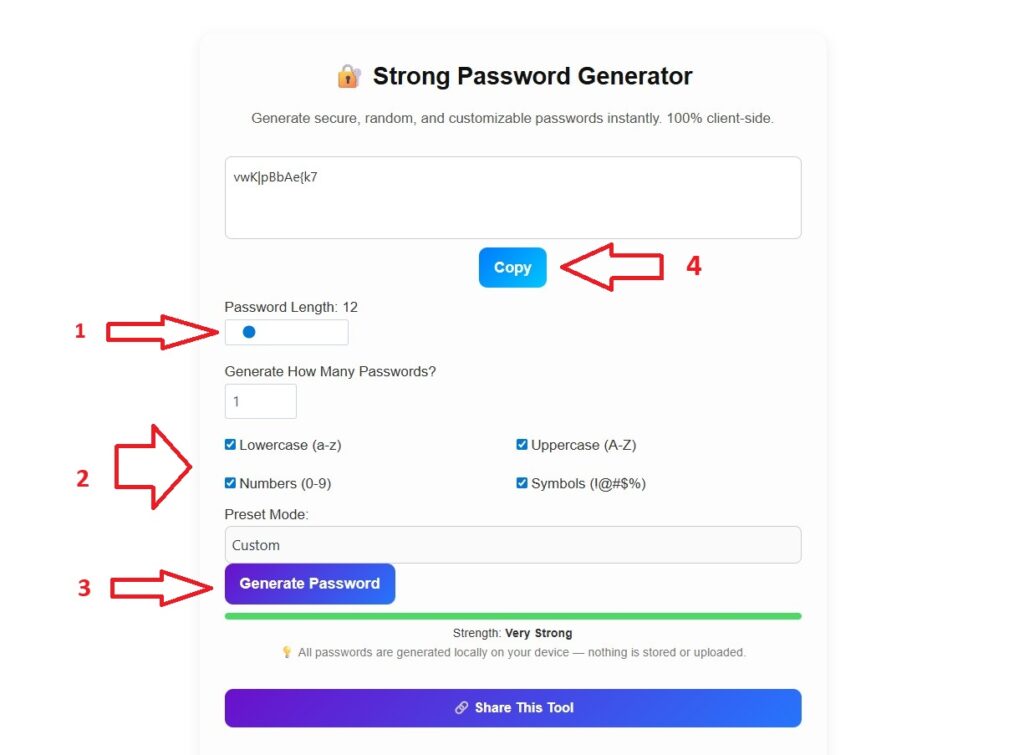
- Select Password Length – Choose how many characters you want (for most websites, 12–16 is ideal).
- Select Options – Enable or disable uppercase letters, numbers, and special characters as per your preference.
- Generate Password – Click the Generate button and your secure password appears instantly.
- Copy or Download – Click the copy icon to use it directly, or generate a list of multiple passwords for bulk use.
No login. No waiting. Just instant security.
Example Passwords
| Type | Example Password |
|---|---|
| Strong (Default) | aT#p6V!dL2@x |
| Very Strong | X@r7!kE3mT#vQ2L* |
| Medium | aP4mL8tN9 |
| Simple (only letters) | mySecurePass |
Each time you click Generate, a completely new, unique password is created using randomization algorithms — ensuring no two users ever get the same result.
Bulk Password Generator Mode
Need multiple passwords at once for your work accounts or team logins?
Our Bulk Password Generator option allows you to generate up to 20 unique passwords in one click.
Perfect for:
- IT professionals setting multiple accounts
- Website admins managing credentials
- Developers working on staging environments
- Digital agencies handling multiple client logins
And just like individual passwords, all are generated securely within your browser.
Why Choose ToolsWindow Password Generator?
There are hundreds of password tools online — so why use ours?
Here’s what makes ToolsWindow different :
1. 100% Client-Side
No password ever leaves your device. Everything happens inside your browser. Even we can’t see what you generate.
2. Lightweight & Super Fast
Unlike heavy online tools, our password generator is built with pure HTML, CSS, and JavaScript, making it lightweight and mobile-friendly.
3. Clean & Modern UI
A clutter-free, simple design that works equally well on mobile or desktop. You don’t need to be tech-savvy to use it.
4. Bulk Mode Support
Generate one or twenty — this tool handles it all without slowing down.
5. No Login, No Ads
No annoying popups or signups. Just a clean, distraction-free tool you can use anytime.
6. Free Forever
All tools on ToolsWindow are 100% free — forever. No premium trap, no hidden fees.
Tips for Creating the Perfect Password
Even with a password generator, a few smart habits can keep you safer online:
- Use a unique password for every site
- Change important passwords every few months
- Avoid personal info like your name, phone, or birthday
- Use a password manager to store passwords safely
- Combine uppercase, lowercase, numbers, and symbols
Example of a perfect strong password:
S@f3#T9x!L2mV8
It’s long, random, and unguessable — exactly what hackers hate.
Why Google Loves This Tool (SEO Insight)
This page is fully optimized for:
- ✅ “password generator online”
- ✅ “strong password generator”
- ✅ “secure password creator”
Each word naturally fits in context, helping Google understand the usefulness of the content.
Since the tool is interactive, fast, and provides immediate value, it has a high engagement rate — which is a strong ranking factor.
Plus, the integrated SoftwareApplication Schema gives Google an extra signal that this is a trusted, functional web app, not just a blog post.
Frequently Asked Questions (FAQ)
1. Is this password generator safe to use?
Yes! 100%. The entire process happens inside your browser (client-side). Your password is never stored or sent anywhere.
2. Can I generate multiple passwords at once?
Absolutely. Just enable the Bulk Password option and generate up to 20 at once.
3. Does this work on mobile phones?
Yes, the tool is responsive and tested across all modern devices and browsers.
4. What is the best password length?
For most users, 12–16 characters is perfect. For banking or sensitive data, go for 20+ characters.
5. Is it free forever?
Yes. ToolsWindow Password Generator is completely free and will always remain so.
About ToolsWindow
ToolsWindow.com is a growing platform that offers simple yet powerful online tools to make digital life easier.
From Word Counter to Image Compressor, and now Password Generator, every tool is designed with:
- Speed
- Privacy
- Simplicity
Our mission is to help creators, developers, and everyday users save time and stay secure online.
Final Thoughts
In a world full of cyber threats, a strong password is your first line of defense.
With the ToolsWindow Password Generator, you don’t need to worry about remembering or creating complex passwords — we handle the heavy lifting for you.
It’s free, fast, and secure — just like the internet should be.
If You Found this useful, Please Share This Tool with your Friends and Family
Try it now:
- Free Image Compressor Tool (Compress Images Without Quality Loss)
- Free Image to PDF Converter – Fast, Secure & 100% Browser-Based
- Free Online Word & Character Counter Tool
- Free YouTube Earnings Calculator 2025 [Free Calculator]
- 100% Free Image Resizer Online – Resize JPG, PNG, WEBP (Bulk & Fast)
- Best Free QR Code Generator (Custom QR Code With Logo in 2025)
- Funny Pet Name Generator (Find the Perfect Name for Your Pet Instantly)
- Best Free Email Name Generator 2025 (Create Professional Usernames Instantly)